How to Extract Subtitles from MP4 Videos
Extracting subtitles from MP4 videos is a practical need that many people encounter. You may want to make videos more accessible, facilitate reuse of subtitle text in other works, or simply want a text transcript for quiet reading, or to translate video interview content for fans.
However, many people are not clear on how to do this, especially when facing hard-coded or embedded subtitles in videos, they feel even more at a loss. Actually, as long as you choose the right tool, such as ViiTor AI Video Translation Pro function, you can quickly and easily extract subtitles from MP4 and save them as text files. The entire process is simple and worry-free. This article will break down the complete process into clear steps for you to follow step by step.
Table of Contents
- Why extract subtitles from videos
- Detailed explanation of subtitle formats
- Methods for extracting hard-coded subtitles
- Step-by-step guide to extracting subtitles from videos
- Practical tips for extracting subtitles
- Frequently asked questions
- Summary
Why Extract Subtitles from Videos
Extracting subtitles from video files means separately extracting the subtitle text displayed on the screen. For content creators and ordinary users, this operation can make videos more suitable for hearing-impaired people, or users watching in silent environments.
- In English-speaking regions, over 28% of viewers watch foreign language content with subtitles.
- After obtaining subtitle text, video translation becomes more convenient, and you can also adapt audio content into articles, social media copy, etc.
Detailed Explanation of Subtitle Formats
Subtitles in videos mainly exist in two forms:
- Independent subtitle files: These are external files, common formats include .srt, .vtt, stored separately from the video. When loading the video, pairing with such files can display subtitles, and they can be opened and modified with ordinary text editors.
- Embedded subtitles: Directly contained within the video file. They are further divided into soft subtitles and hard subtitles:
- Soft subtitles: Encapsulated as independent subtitle streams in the video, can be freely turned on or off;
- Hard subtitles (also called burned-in subtitles): Permanently composited into the video image, cannot be turned off or removed.
Only when facing hard-coded subtitles do you need to use more targeted methods for extraction. Fortunately, there are currently various feasible solutions.
Methods for Extracting Hard-coded Subtitles
There are mainly the following ways to extract hard subtitles, each with its own characteristics:
- Manual transcription and typing: A more traditional method, suitable for users willing to spend time. Play the video while pausing, typing, rewinding, and repeating operations. Although time-consuming and labor-intensive, if you like careful verification and pursue precision, this method is very suitable.
- OCR optical character recognition: Relies on technology to directly "recognize" text from video images. It works better when subtitle fonts are clear and contrast is high, but errors occur easily when videos are blurry or fonts are fancy. Tesseract is a commonly used open-source OCR tool that can be used to recognize video subtitles.
- AI speech recognition to subtitles: Tools "listen" to video audio and automatically convert speech to text, equivalent to an efficient version of automatic transcription. Much faster than manual work, but accuracy is affected by audio quality and speaker accent.
If you pursue simplicity and efficiency, the following will use AI subtitle recognition tools to teach you step by step how to extract subtitles from MP4.
Step-by-step Guide to Extracting Subtitles from Videos
Using ViiTor AI's online automatic subtitle generator — Video Translation Pro function, you can conveniently extract video subtitles into text files. The tool automatically generates subtitles, supports direct checking and modification to ensure content accuracy, and only requires a browser and videos to be uploaded.
Upload MP4 Video with Hard-coded Subtitles
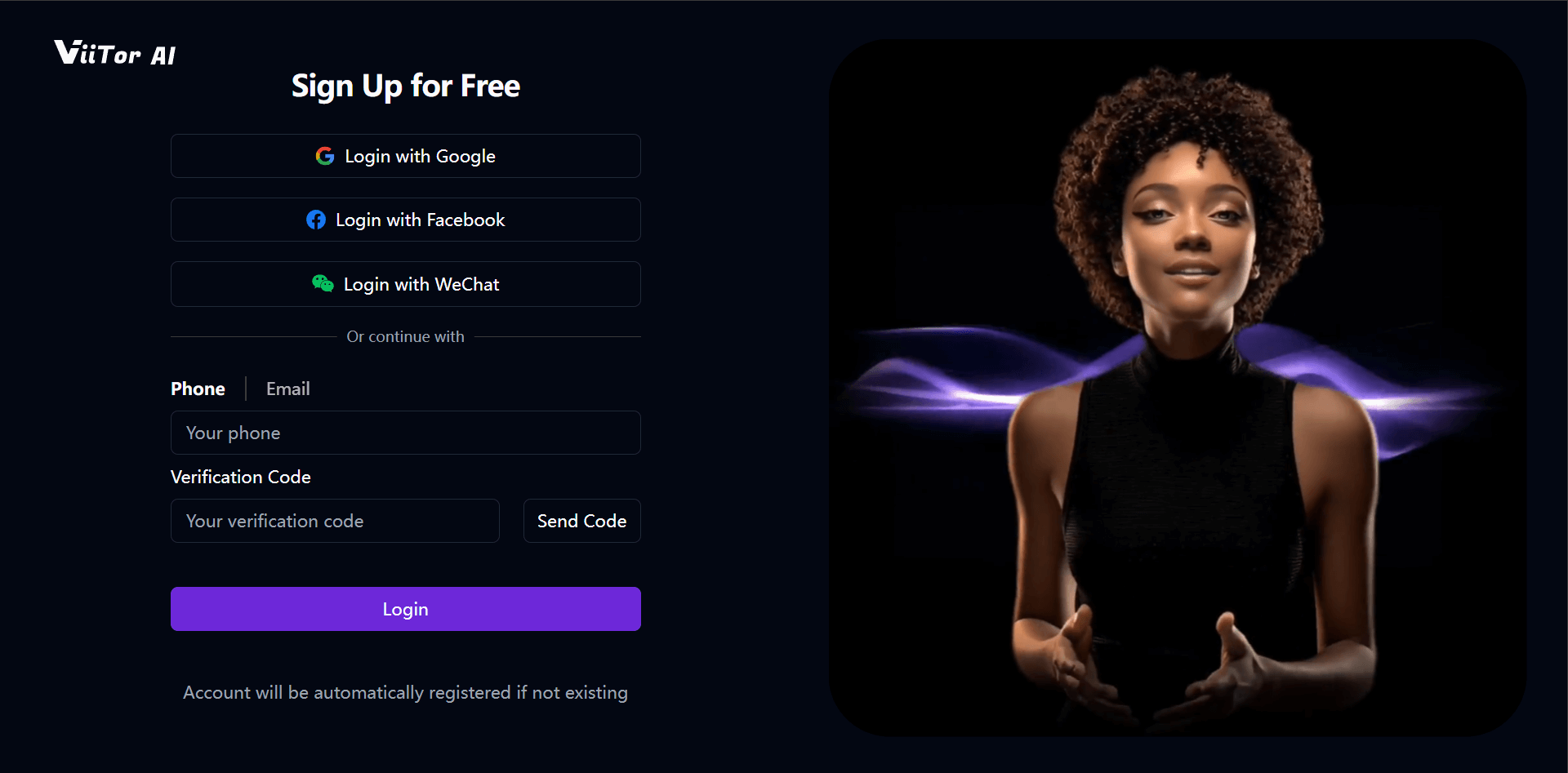
First log in to ViiTor AI. Unregistered users can quickly register via email or phone number, or register and log in using social accounts.
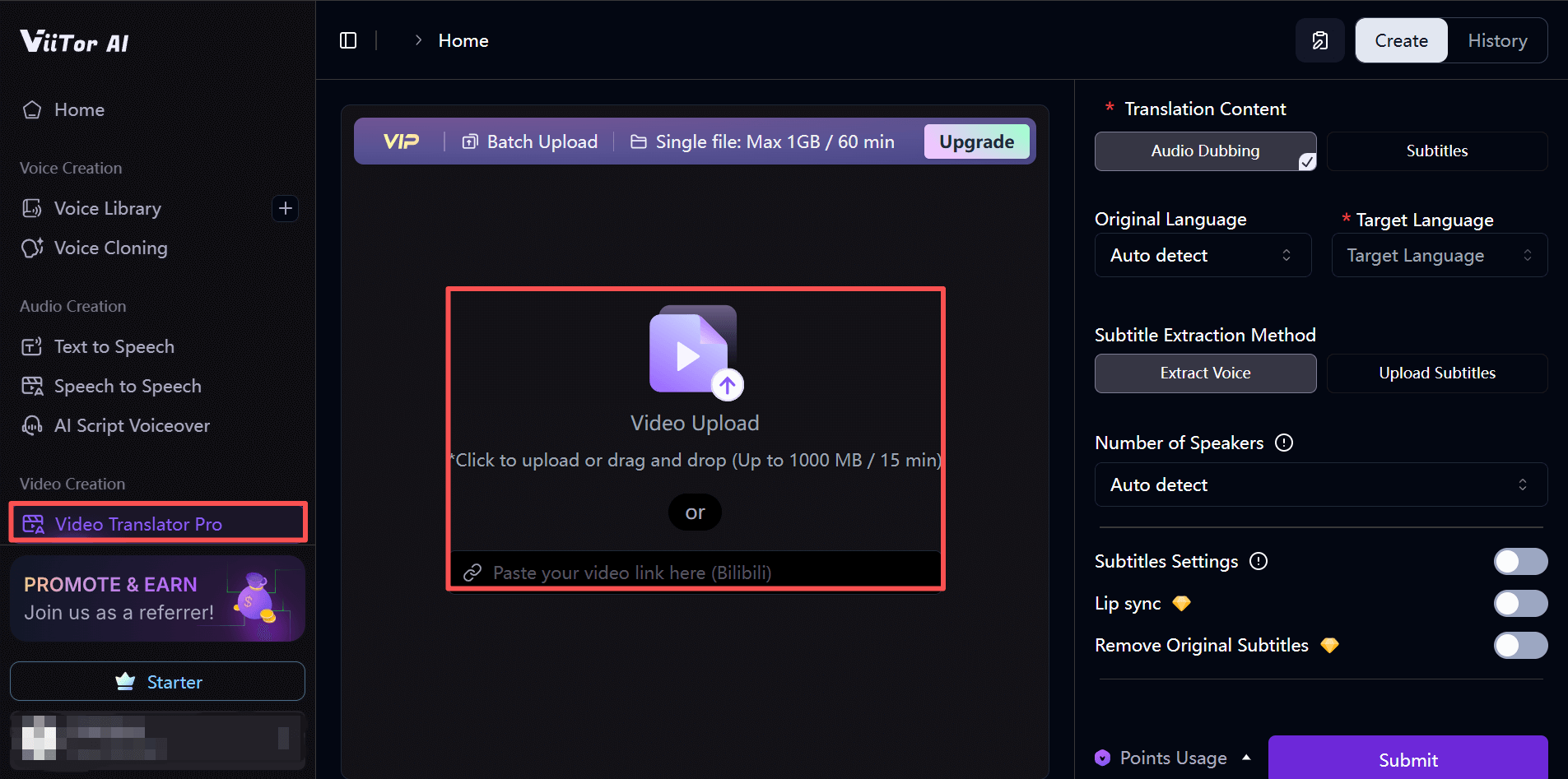
Enter ViiTor AI Video Translation Pro function, click "Video Upload", and upload the MP4 video from your local device.
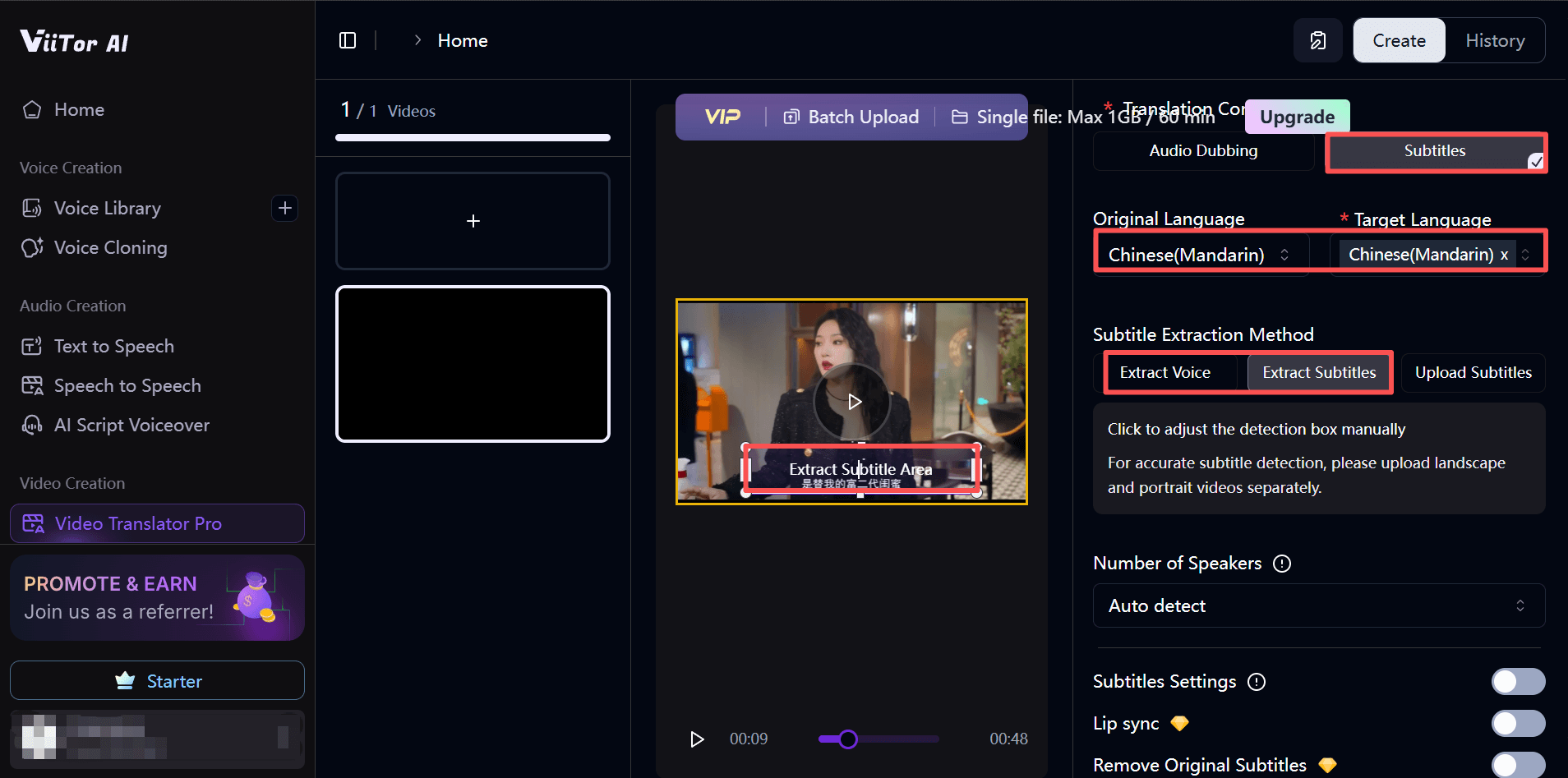
Start Extracting MP4 Video Subtitles
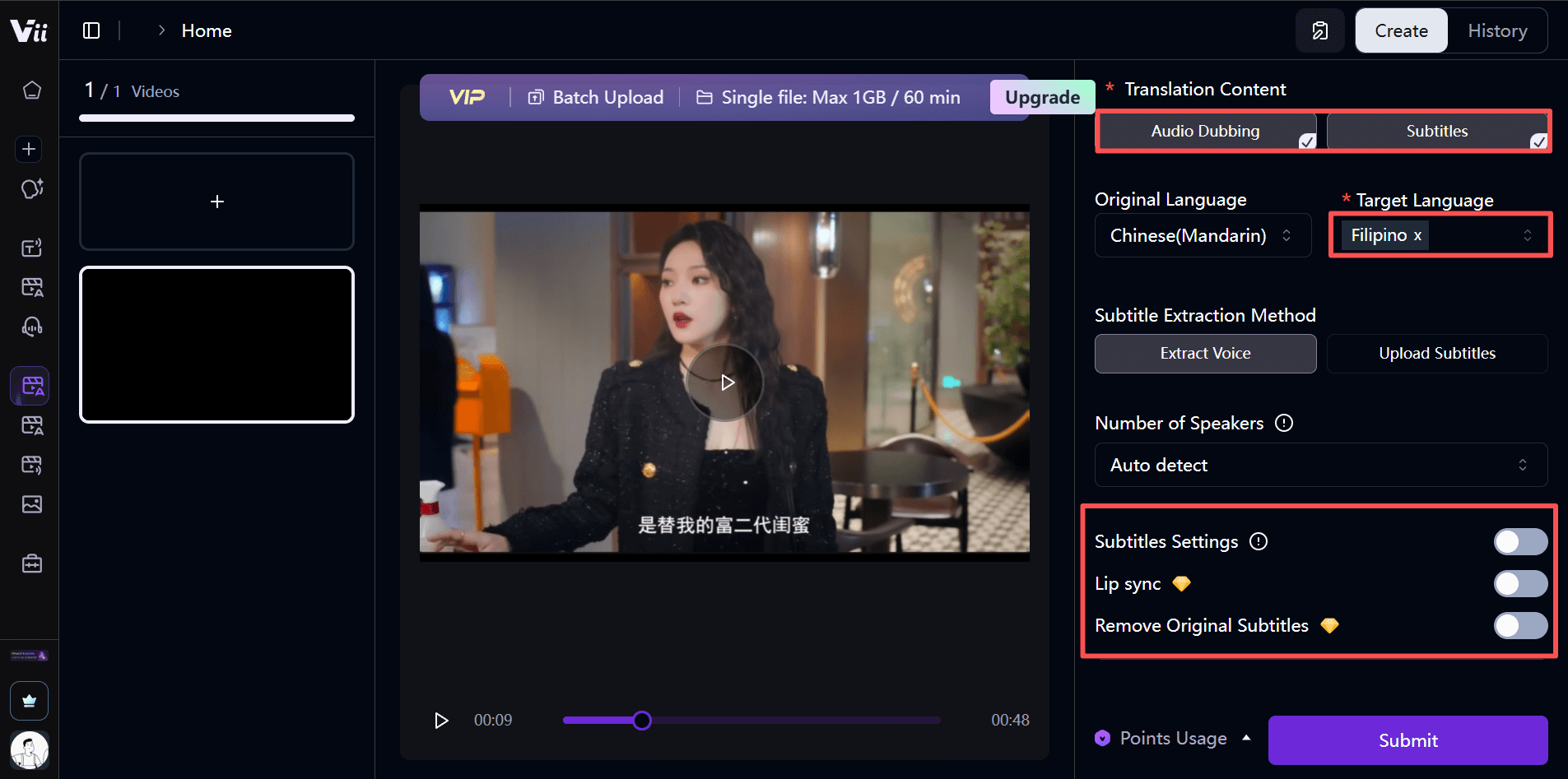
After the video is uploaded, select "Translate Subtitles", select the language used in the video, and for the target language directly select the same language as the source language. You can choose to extract and generate subtitles through speech or subtitles, and finally click "Submit". The tool will automatically generate a new video with extracted subtitles.
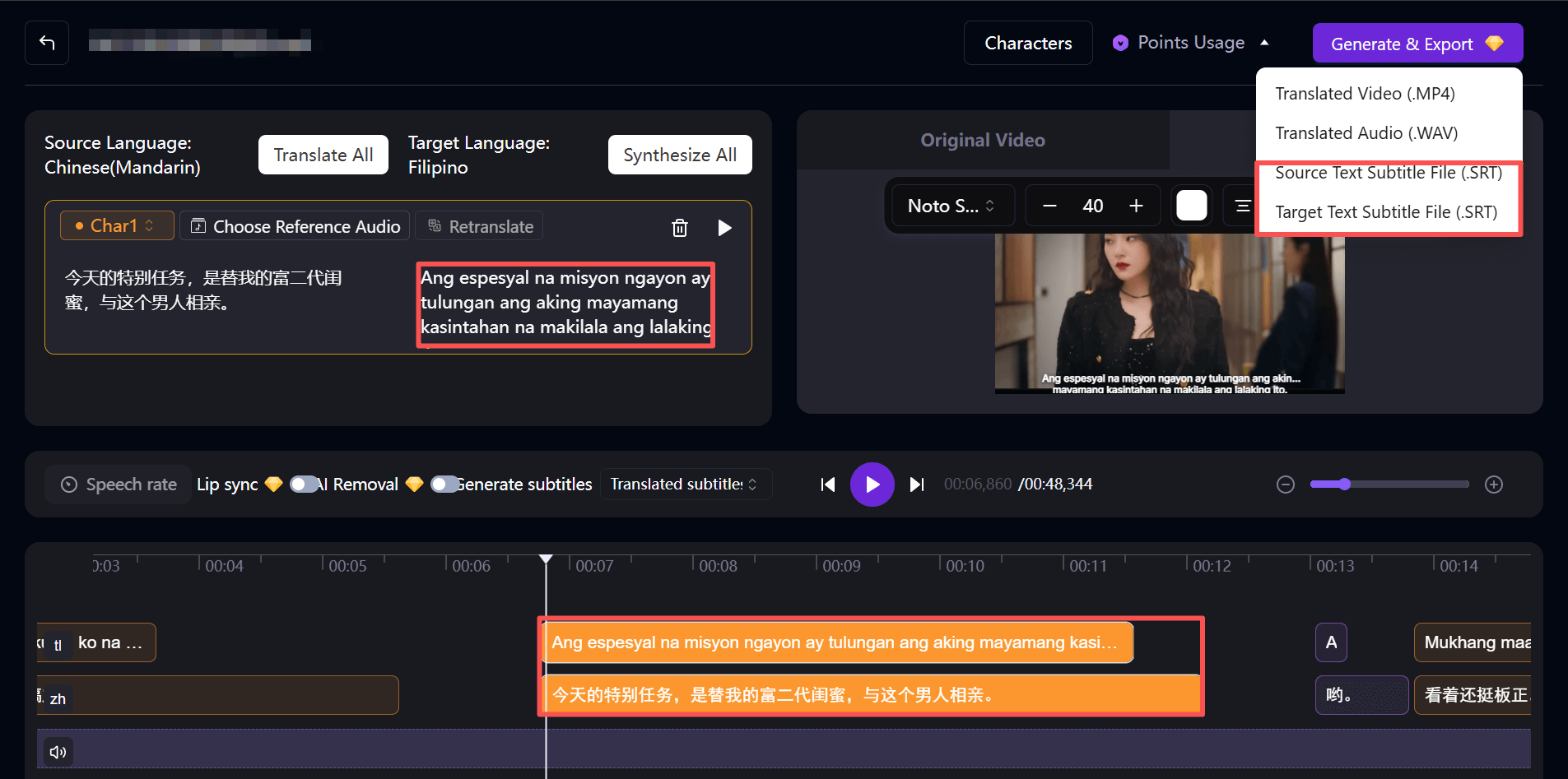
Download as SRT File
After subtitles are generated, it is recommended to manually verify them. If errors are found, you can directly modify the text and corresponding timeline within the tool. In the upper right corner, you can choose to export only subtitles, which can be used for subsequent video subtitle addition, or directly read as a text transcript.
Translate Subtitles
If you need to translate into other languages, modify the "Target Language" for translation in the task submission interface, then click "Submit" to view results. You can also directly dub the translated video, add bilingual subtitles, or directly erase original subtitles and keep only translated subtitles or dubbing.
Export Video with Embedded Subtitles
After previewing without errors, you can save the new video with embedded subtitles locally.
Practical Tips for Extracting Subtitles
If you want to extract subtitles more accurately and efficiently, you can refer to these tips:
- Choosing the correct language version can significantly improve recognition accuracy.
- Keep video audio as clear as possible, avoid multiple people speaking simultaneously or mixing multiple languages.
- Automatic extraction is not as precise as manual work. Before final use, be sure to proofread text, timelines, and punctuation.
- The tool will continue to update and optimize. You can check the help center for the latest usage instructions.
Frequently Asked Questions
- Can hard-coded subtitles be extracted from videos?
- Yes. Hard subtitles are embedded in the image, and text can be extracted through manual transcription and typing, or using OCR, AI speech recognition software.
- Which subtitle formats are supported for download?
- ViiTor AI supports exporting the universal SRT format, compatible with most video players, making it convenient to re-add to videos.
- Can subtitles be translated within ViiTor AI?
- Yes, the tool comes with translation functionality and supports translating extracted subtitles into multiple languages.
Summary
Extracting subtitles from MP4 videos is not complicated. With ViiTor AI Video Translation Pro function, you can easily convert video speech into editable subtitles or directly perform secondary editing and creation. Whether improving video accessibility, adding subtitles, or translating video content, this tool can simplify the process, making the entire operation fast and worry-free.