Since Instagram launched Reels in 2020, this feature has remained a focal point of attention. It continues to be an important means of increasing exposure for any business or content on Instagram. Did you know that 86% of consumers say they will recommend or try a product when it has "shareability" - and Reels is the most popular "sharing format" among Instagram users. As the saying goes: "Record when you're inspired"!
Instagram has 2 billion monthly active users, and this number continues to grow. These active users can see Reels content on the Explore page and in their own feeds. So why not create engaging Reels for your audience?
One of the most interesting ways to create engaging short videos is to use Instagram's text-to-speech feature, allowing you to add voiceovers to your Reel without making any sound yourself!
Simply enter your script, choose your preferred voice, and you're done! You'll have a wonderful voiceover to accompany your Reels. You can add fantasy, robotic sound effects for sci-fi content, or distort your voice to sound like you've inhaled helium. The creative opportunities are endless. Whether you're a business owner, content creator, or just want to elevate your social media game, the text-to-speech feature is an essential tool for you.
Instagram Reels Text-to-Speech Feature Usage Guide
How to Dub the text. in Instagram Reels
- Launch the Instagram app and start creating a Reel.
- After recording your Reel or selecting short video clips to add to your Reel, tap the "Aa" text symbol on the bottom panel.
- Enter your text, then choose how you want the text to appear.
- At the bottom, tap the alignment, color, highlight, and animation options for the text.
- When satisfied with the text, tap "Done".
- On the screen, tap and drag your text, or pinch to change the font size.
How to Use Instagram Reels' TTS Feature to Add Subtitles to Text

- Long 3press the text bubble.
- In the pop-up menu, tap the "Text-to-Speech" option.
- Swipe up and down to get more different voice options based on gender and style.
- You can choose from different text-to-speech voices and preview each one.
- When satisfied with the audio, tap to select the voice you want to use and tap "Done".
- Swipe up on the screen to open the timeline, check and sync the text and Subtitles.
- When satisfied with the output, tap the arrow button in the top right corner to publish your Reel for the world to see!
Note: Text-to-speech in Reels is currently only available in English in the following countries/regions that provide subtitles: UK, USA, Canada, Australia, New Zealand, Singapore, Ireland, and India (English only).
Benefits of Using Text-to-Speech on Instagram Reels
Accessibility - Instagram Reels for Everyone
Using text-to-speech makes Instagram Reels more accessible. It's an excellent way to make your content more accessible and inclusive for visually impaired individuals, people with ADHD, dyslexia, and others with disabilities. By including voiceovers with text, these individuals can appreciate and interact with content on Reels.
Expand Audience Reach - The World at Your Fingertips
By leveraging Instagram's text-to-speech feature, businesses and influencers can create voiceovers in various voice styles, which will help maximize social media marketing effectiveness. Instagram's TTS feature enables users to add interesting commentary and surprise elements to their Reels, helping to capture viewers' attention, make content more interactive, thereby increasing engagement and improving overall user experience.
Save Time - Double Efficiency
Time is the world's most precious commodity. By using text-to-speech in Reels, content creators can save time by quickly converting text to audio. This is particularly useful for businesses and influencers with high content creation volumes. By streamlining the content creation process, TTS helps Instagram users invest more time in other aspects of their business, such as engagement and analytics.
Limitations of Instagram Text-to-Speech
While Instagram's text-to-speech feature has many benefits, it also has the following limitations:
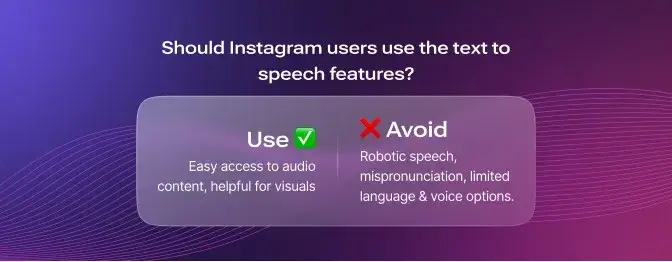
- Lack of Naturalness: The voice generated by the new feature sometimes sounds robotic and unnatural, which may not be favored by users who prefer human-like voices.
- Insufficient Customization: The feature may sometimes mispronounce certain words. It needs help accurately interpreting the intended tone or emotion behind the text, which may lead to inappropriate or confusing speech. For example, the word "live" can be pronounced as "liv" or "laive" depending on context.
- Language Limitations: The text-to-speech feature on Instagram currently only offers English with two voices, both with similar accents: Voice 1 is a female voice, and Voice Option 2 is a male voice. This lack of diversity in different voices may limit and reduce inclusivity for users from different language backgrounds.
Why You Should Use ViiTor AI for Text-to-Speech in Reels
ViiTor AI is the perfect choice for anyone wanting to create high-quality voiceovers for their video or audio projects. With its fast cloning, multilingual support, rich voice selection, flexible adjustment, and other features, it stands out as a top TTS solution for Instagram Reels.
Fast Cloning - 3-Second Rapid Voice Cloning
ViiTor AI offers industry-leading 3-second rapid voice cloning functionality, perfectly replicating target voices in minimal time, giving your Reels content a personalized voice experience.
Multilingual Support - Global Coverage
ViiTor AI supports 19 languages, meeting dubbing needs in different regions, allowing your Reels content to easily reach audiences worldwide and expand international influence.
Rich Voice Selection - Meeting Diverse Needs
ViiTor AI provides thousands of voice options, including broadcasting style, gentle female voices, and various styles, meeting your needs for different dubbing styles, ensuring every Reel finds the most suitable voice
Flexible Adjustment - Creating Natural and Vivid Dubbing
ViiTor AI allows you to flexibly adjust speech speed and emotion, making dubbing more natural and vivid, accurately conveying the emotional tone of the content, and enhancing audience emotional resonance.
Efficient Creation - Improving Knowledge Video Efficiency
ViiTor AI can replace human dubbing, significantly improving the creation efficiency of knowledge-based videos, allowing you to produce high-quality Reels content more quickly and maintain content update frequency.
Wide Application Scenarios - Unlimited Creativity
ViiTor AI is suitable for various scenarios, including film and television line modification (such as Zhen Huan Biography character voice cloning), self-media video dubbing, live stream clip translation, product introduction video dubbing, etc., providing unlimited possibilities for your creativity.
Using ViiTor AI to Add Voiceovers to Instagram Reels
Adding voiceovers has never been faster and easier. Imagine a platform where you can now add your video, synchronize it with your high-quality voiceover, and add music. Once ready, all you need to do is upload it to your Reels and add your favorite sound effects. Let's explore how to add your video with voiceover to your Instagram Reels.
- Open the ViiTor AI platform
- Create a new project
- Choose voice cloning or directly select a preset voice
- If choosing voice cloning: Upload a 3-second target voice sample and wait for the system to complete cloning
- If choosing a preset voice: Select a voice suitable for your content from thousands of options
- Enter your text script
- Adjust speech speed and emotion parameters to make the dubbing effect meet your expectations
- Click the generate button and wait for the system to generate a high-quality voiceover
- Preview the generated voiceover and make fine adjustments if needed
- Synchronize the generated voiceover with your video
- Export the video file containing the voiceover
- Upload the video file to Instagram Reels, add your favorite sound effects, and you're done!
The integration of TTS technology with different sound effects on Instagram Reels provides a promising trend for improving accessibility and enhancing the platform's user experience. ViiTor AI simplifies the process of creating high-quality voiceovers for Instagram Reels and other social media accounts. With its fast cloning, multilingual support, rich voice selection, and flexible adjustment features, ViiTor AI provides content creators with a powerful solution to save time and effort. By embracing these technological advancements, businesses and influencers can expand their audience reach and stay ahead in the Instagram game.
As more creators and businesses expand their voiceover workflows for Reels and other video content, ViiTor AI also provides a powerful real-time and high-volume solution supporting automation and global deployment.
ViiTor AI:Leading Text-to-Speech Solution
ViiTor AI is designed to provide fast, high-quality voice cloning and dubbing services, meeting various content creation needs. Whether you're an individual creator or a business user, ViiTor AI delivers exceptional voice solutions.
Core Advantages
- 3-second rapid voice cloning, saving creation time
- Support for 19 languages, global coverage
- Thousands of voice options, meeting diverse needs
- Flexible adjustment of speech speed and emotion, creating natural dubbing
- Replaces human dubbing, improving creation efficiency
- Suitable for multiple application scenarios, unlimited creativity
Application Scenarios
- Film and television line modification: Such as Zhen Huan Biography character voice cloning
- Self-media video dubbing: Adding professional dubbing to various content
- Live stream clip translation: Real-time translation and dubbing of live stream content
- Product introduction video dubbing: Adding professional commentary to product videos
- Knowledge-based video creation: Quickly producing high-quality educational content
Simple and Easy to Use
The ViiTor AI platform is designed to be concise and intuitive, allowing quick mastery without professional skills. From voice cloning to dubbing generation, the entire process is simple and efficient, letting you focus on content creation rather than technical details.
Cost-Effective
ViiTor AI offers flexible pricing plans to meet the needs of users of different scales. Whether you're an individual creator or a large enterprise, you can find a plan suitable for yourself, reducing dubbing costs.
Fast cloning, multilingual support, rich voice selection. Try ViiTor AI now!