


How to Translate YouTube Videos to English Without Captions | Easy AI Subtitle Translation Guide
Have you ever found a perfect YouTube video only to discover it's in another language and has no subtitles or captions (CC)? Millions of viewers and creators encounter this problem every day. Whether it's a foreign language tutorial, an interview, or a documentary, understanding YouTube videos without English subtitles is a significant challenge.
However, traditional translation processes involve extracting audio, transcribing it, translating the text, and then manually synchronizing all the content. While this approach is feasible, it is typically slow, complex, and costly.
Fortunately, by 2025, powerful AI video translators like ViiTor AI will be able to translate YouTube videos without existing subtitles. Even better, it can automatically dub the videos into English and features lip-syncing and voice cloning.
In this guide, we'll show you how to translate YouTube videos without English subtitles, compare the best available tools, and explain why ViiTor AI is the most complete solution on the market.
What if a YouTube video doesn't have English subtitles?
Translating YouTube videos without subtitles typically involves first transcribing the video content, then translating it into another language (such as English), and finally generating subtitles or voiceovers. Below are the basic principles and specific steps for translating YouTube videos without subtitles:
Step 1. Audio extraction from video: Extracting clear audio is simple if the speech is isolated and clear. However, background noise or music can complicate the process and may require additional processing.
Step 2. Transcription: Automated transcription often needs manual review to ensure accuracy.
Step 3. Translation and proofreading: Translating and refining the transcript usually takes more than 1 day.
Sept 4. Text-to-Speech: Automated text-to-speech (TTS) tools can generate audio quickly but often lack emotional nuance. Many creators prefer professional voice actors, which can take 2–5 days and cost between $10 and $200 for a 3-minute video.
Step 5. Editing and synchronization: Finally, aligning the new audio or subtitles with the video—ensuring every word is perfectly timed—typically takes 1–3 days.
Basic Principles of Translating a YouTube Video to English Without CC
Accuracy First: Ensure that the transcription and translation faithfully represent the original meaning, avoiding any misinterpretation.
Synchronization: Subtitles or voiceovers must align with the visuals and the rhythm of the original speech.
Readability: The translated language should be natural, fluent, and conform to the conventions of the target language.
Cultural Adaptation: Adjust expressions appropriately to make the content more relatable to the cultural background of the target audience.
Copyright Compliance: Make sure you have the necessary rights to translate and republish the video.
Why YouTube's Built-in Translation Isn’t Enough
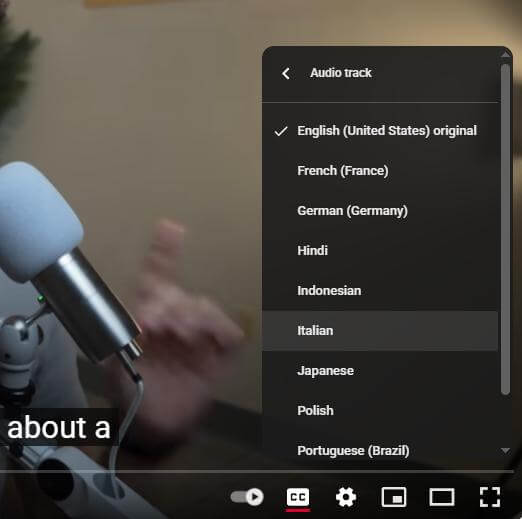
YouTube does have an auto-translate feature, but it only works when:
The video has captions or subtitles (either auto-generated or manually added)
The creator has enabled translation settings
If the video doesn’t have closed captions (CC), YouTube won’t offer translation. That’s a huge problem for viewers of vlogs, tutorials, gaming videos, interviews, or regional content where the creator didn’t upload subtitles. That’s where external AI translation tools come in.
How to Translate a YouTube Video to English Without CC
AI-powered video translation tools can analyze audio tracks, transcribe speech, translate it into the target language, and even generate dubbing without existing subtitles. Some platforms, such as ViiTor AI, also offer lip-syncing, voice cloning, and multi-speaker detection features, making the experience smooth and natural, just like real voice-over.
How to use ViiTor AI to translate YouTube videos into English
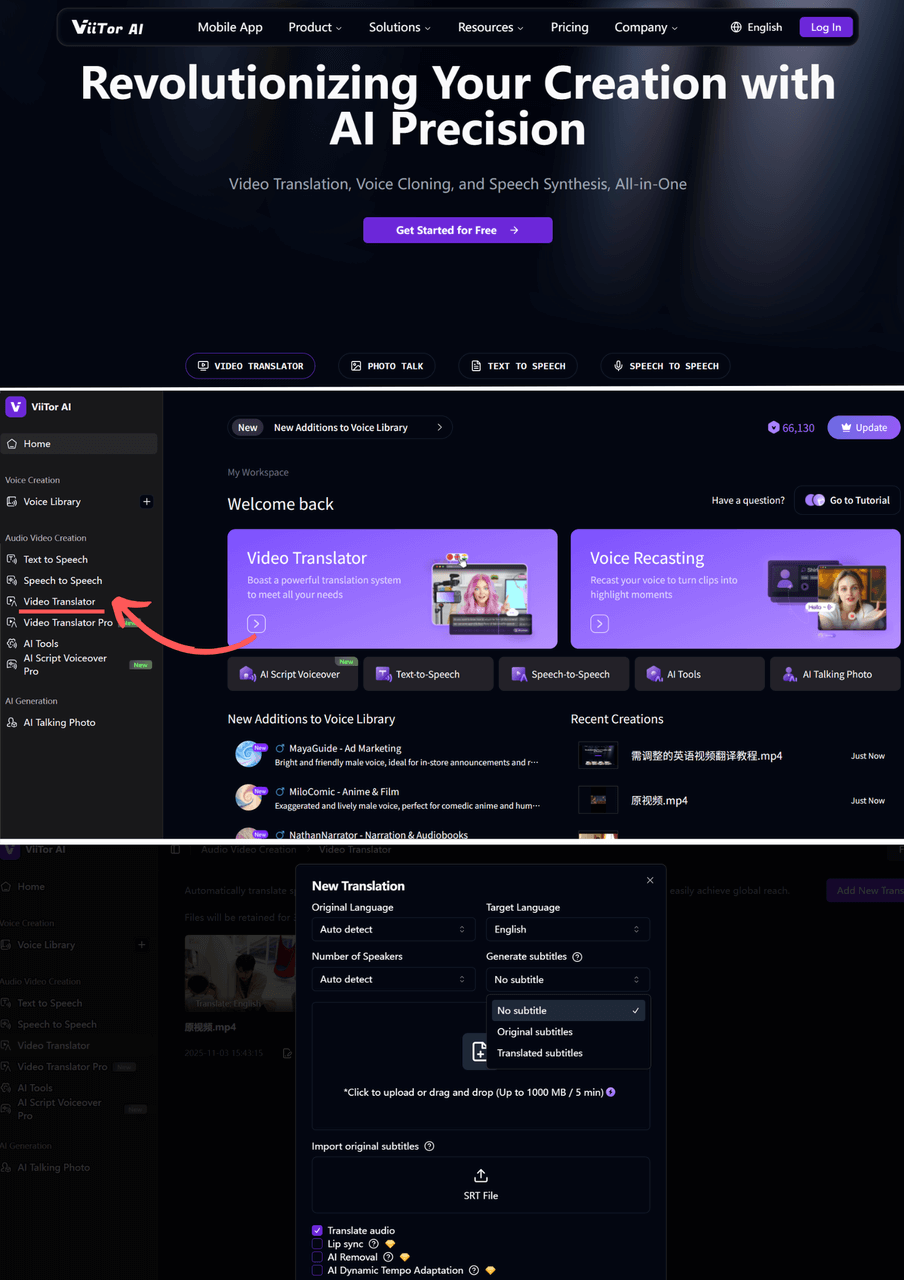
1.Upload your original video
Log in to ViiTor AI → Click "Video Translation" → Upload your local video file
Supported formats: MP4, MOV, AVI, and other mainstream formats
2.Set the translation language
Select the original language of the video from the "Source Language" drop-down menu.
Select the desired subtitle language from the "Target Language" drop-down menu.
Enable subtitle generation: Check the "Generate Subtitles" option.

3.AI Automatic Generation & Proofreading & Export
Click "Start Translation" → Wait for AI to automatically transcribe, translate, and timeline the subtitles. After confirming that everything is correct → Click "Export" → Download the SRT subtitle file.
Key features of ViiTor AI:
Multilingual Video Translation: Supports translating videos into 19 languages and accents, including English, Spanish, French, Arabic, and Chinese, ensuring clear and natural delivery.
Automatic Speech Recognition and Transcription: Automatically transcribes spoken content from videos, recognizing multiple speakers.
High-Quality AI Dubbing and Voice Cloning: Offers a variety of AI-generated voices with adjustable speed, tone, and emotion (e.g., happy, angry), and supports voice cloning for more natural dubbing.
Advanced Lip-Sync Technology: Employs next-generation lip-sync technology to precisely match the translated speech with the speaker's lip movements, enhancing realism and the viewer experience.
Subtitle Generation and Editing: Automatically generates subtitles. The Video Translation Pro feature provides an advanced editor for users to modify translated text, re-dub, or switch speakers—at at no extra cost.
Don't hesitate—try using ViiTor AI to translate YouTube videos into English now, without subtitles!
Why AI Dubbing Is Better Than Subtitles (Sometimes)
Subtitles vs AI dubbing: Subtitles have long been the go-to method for making videos accessible across languages, but they’re not always the best solution. In many situations, AI dubbing can significantly improve viewer experience, engagement, and reach. Here’s why:
Makes content more immersive
Keeps eyes on the video (not reading)
Reaches audiences with literacy or accessibility needs
It is perfect for younger viewers and mobile users
AI voice dubbing used to be expensive. Not anymore. VMEG’s free plan lets you get started at no cost.
Frequently Asked Questions about Transcription of YouTube Videos Without Subtitles
Q1. Can I transcribe YouTube videos without subtitles?
A1: Yes, you can transcribe manually by listening to the audio, or use tools like speech-to-text software or AI transcription services such as ViiTor AI, which can process, transcribe, translate, and dub.
Q2. Do I need subtitles to translate YouTube videos?
A2: No. ViiTor AI works without existing subtitles or closed captions; it uses the audio directly.
Q3. Can I copy my own voice into another language?
A3: Absolutely. ViiTor AI supports custom voice cloning, allowing you to retain the tone, pitch, and rhythm of your own voice in multiple languages. After submitting a short voice training sample, you can use the cloned voice to dub content in Spanish, French, Mandarin, Arabic, or any other supported language, making your translated videos more personalized and realistic.
Q4. Can I transcribe YouTube videos into other languages?
A4: Yes! Tools like ViiTor AI support multilingual transcription. You can translate the video into more than 19 languages and accents as needed. Conclusion: How to Skillfully Translate YouTube Videos
By 2025, you'll be able to enjoy content from around the world without subtitles or CC. Whether you're a viewer trying to understand Korean, Spanish, or Russian videos, or a content creator looking to expand into new markets, AI tools like ViiTor AI represent the future of accessible global video.
ViiTor AI is a powerful translation tool that integrates automatic transcription, language translation, dubbing, lip-syncing, and speaker detection. Based on a streamlined browser platform, it's the best translation tool for YouTube videos (without English subtitles).
→ Experience ViiTor AI now:www.viitor.com