


How to Add Subtitles & Captions to YouTube Videos: 3 Best and Easiest Methods
Subtitles and captions are important for your YouTube videos. Many people watch videos with the sound off, especially in places like cafes, libraries or buses where it’s hard to hear. In fact, 75% of mobile users watch videos silently and most Facebook and YouTube viewers prefer sound-off playback. Without captions, viewers might skip your video and move on to another. Adding subtitles helps more people enjoy your content and keeps them watching. Don’t risk losing your audience!
Looking to add subtitles to your YouTube videos? This blog explains three easy ways to create and upload captions. It also answers common questions to help you add subtitles and improve your video content.
Key Benefits of Adding Captions to YouTube Videos
1. Increased Accessibility
Captions help you reach more people by making your videos easier to understand. They let viewers with hearing loss or learning challenges enjoy your content. Adding captions makes sure everyone can access and enjoy your videos, no matter their needs.
2. Improved Comprehension
Subtitles and captions help your viewers understand your message even if your video has background noise, the person speaking has an accent or the video uses words that are hard to follow. They are useful for explaining technical topics, fast speech and difficult names or terms, so you don’t lose your audience in the details.
3. Enhanced Viewer Experience in Sound-Sensitive Environments
Many people want to watch videos without disturbing others or cannot turn up the volume because they are in public or shared spaces. Captions help you follow along in any place, whether you are on a busy train or in a quiet office. They make your videos easier to watch and let more people enjoy your content in more situations.
4. Boosted SEO (Search Engine Optimization)
Search engines like Google and YouTube cannot understand video or audio directly, but they can read words in captions and subtitles. Captions help your content rank higher in YouTube search results and make it easier for new viewers to find your videos by topic or keyword. When more people can find your videos, your channel gets more views and more engagement. This leads to longer watch times and helps your content grow.
5. Increased Watch Time and Engagement
When you add subtitles to your YouTube video, you make it easier for viewers who need or prefer text. More people stay longer and better understanding helps increase engagement like likes, comments and shares. More watch time helps improve your video’s ranking on YouTube.
6. Wider Reach Through Translation
If your captions are correct and in your original language, it is easier for you or YouTube to create translated subtitles. This helps people from different countries watch your content. Your videos can then be helpful to people who speak many languages.
Open Captions vs Closed Captions vs Translated Subtitles: Which One to Choose
When you search for YouTube how to add subtitles, you’ll hear about open captions, closed captions and translated subtitles. Here’s what makes them different:
Open Captions (OC)
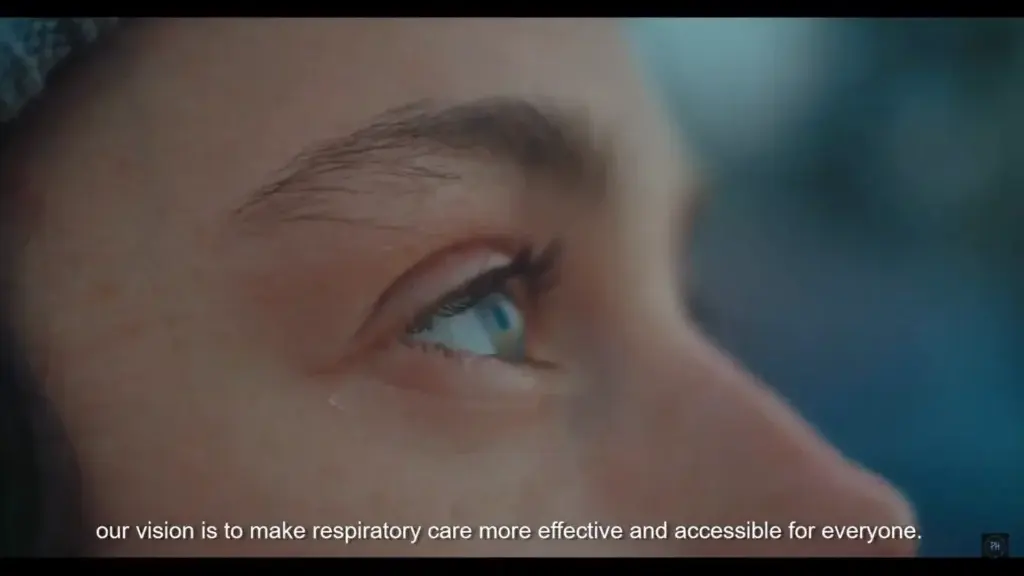
Open captions are text added directly to your video, so they always show for everyone. You choose the font, size, color and placement and they can’t be turned off. They work well for shareable clips or platforms without caption support, but search engines can’t read them for SEO since they’re part of the video image.
Closed Captions (CC)
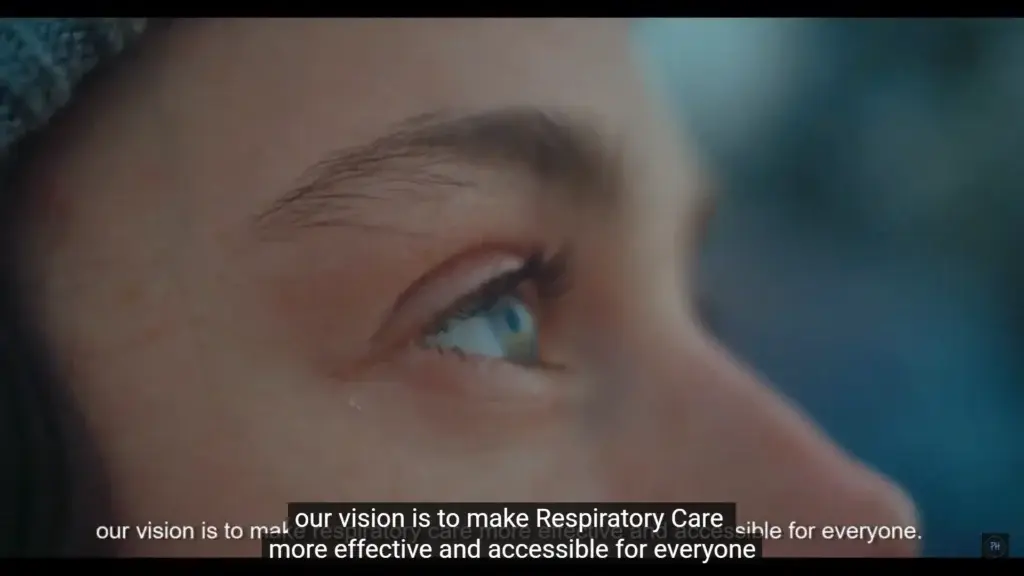
You can upload closed captions as text files like SRT or VTT to YouTube. Viewers can turn them on or off and choose how they look. Closed captions show same-language dialogue and describe sounds or music, making videos accessible. They also help with SEO, making your videos easier to find on YouTube and search engines.
Translated Subtitles (TS)
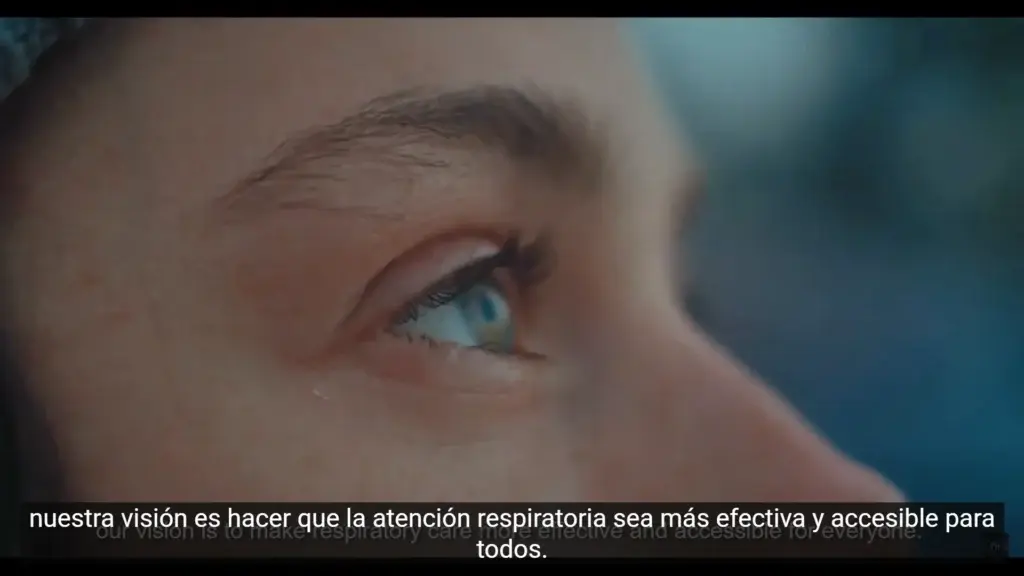
Translated subtitles let you show your video in other languages. For example, if your video is in English, you can add a Spanish SRT file so Spanish speakers can understand it. Viewers can turn subtitles on or off as needed. They help you reach more people and improve SEO by making your video easier to find in different languages.
Comparison Table: Open Captions vs Closed Captions vs Translated Subtitles
| Open Captions | Closed Captions | Translated Subtitles | |
|---|---|---|---|
| Viewer Control | None (Always On) | Yes (On/Off toggle, Appearance customization) | Yes (On/Off toggle, Language selection) |
| Implementation | Burned/Embedded into video file | Separate text file (.srt, .vtt) | Separate text file (.srt, .vtt) |
| Primary Purpose | Guaranteed visibility, Style control | Accessibility (Deaf/Hard of Hearing), Sound-off viewing | Reaching audiences speaking different languages |
| Language vs Audio | Same language as audio | Same language as audio | Different language from audio |
| Includes Non-Speech Sounds? | Can be added, often dialogue-only | Yes, standard practice (music, door slams) | Typically dialogue-only (can be included) |
| SEO Impact | None (text is part of video image) | Yes (Search engines read the separate text file) | Yes (Search engines read the text file in that language) |
| Platform Requirement | None (inherent to video) | Video player/platform must support CC feature | Video player/platform must support subtitle/CC feature |
Which should you choose?
Use closed captions on YouTube to let viewers decide if they want subtitles. They make your videos accessible and boost rankings. Add translated subtitles to reach global viewers. Use open captions for social clips or when you want full control and they need to stay visible. Here’s how to choose:
Use Closed Captions (CC):
- You want search engines to pick up your keywords for SEO
- You want to offer the viewer a choice of turning them on or off
- You want to describe non-speech sounds
Use Translated Subtitles (TS):
- You’re targeting viewers who speak different languages than your main audio
- You want to expand your reach to an international audience
Use Open Captions (OC):
- You want extras like fancy fonts or brand colors
- Your platform or audience requires always-visible text
- Your video will be watched somewhere without CC support
How to Add Open Captions to YouTube Videos
If you want to know how do you add subtitles to a YouTube video with open captions, follow these steps. Open captions are burned into your video and cannot be turned off.
1. Upload your original video
Log in to ViiTor AI → Click "Video Translation" → Upload your local video file
Supported formats: MP4, MOV, AVI, and other mainstream formats
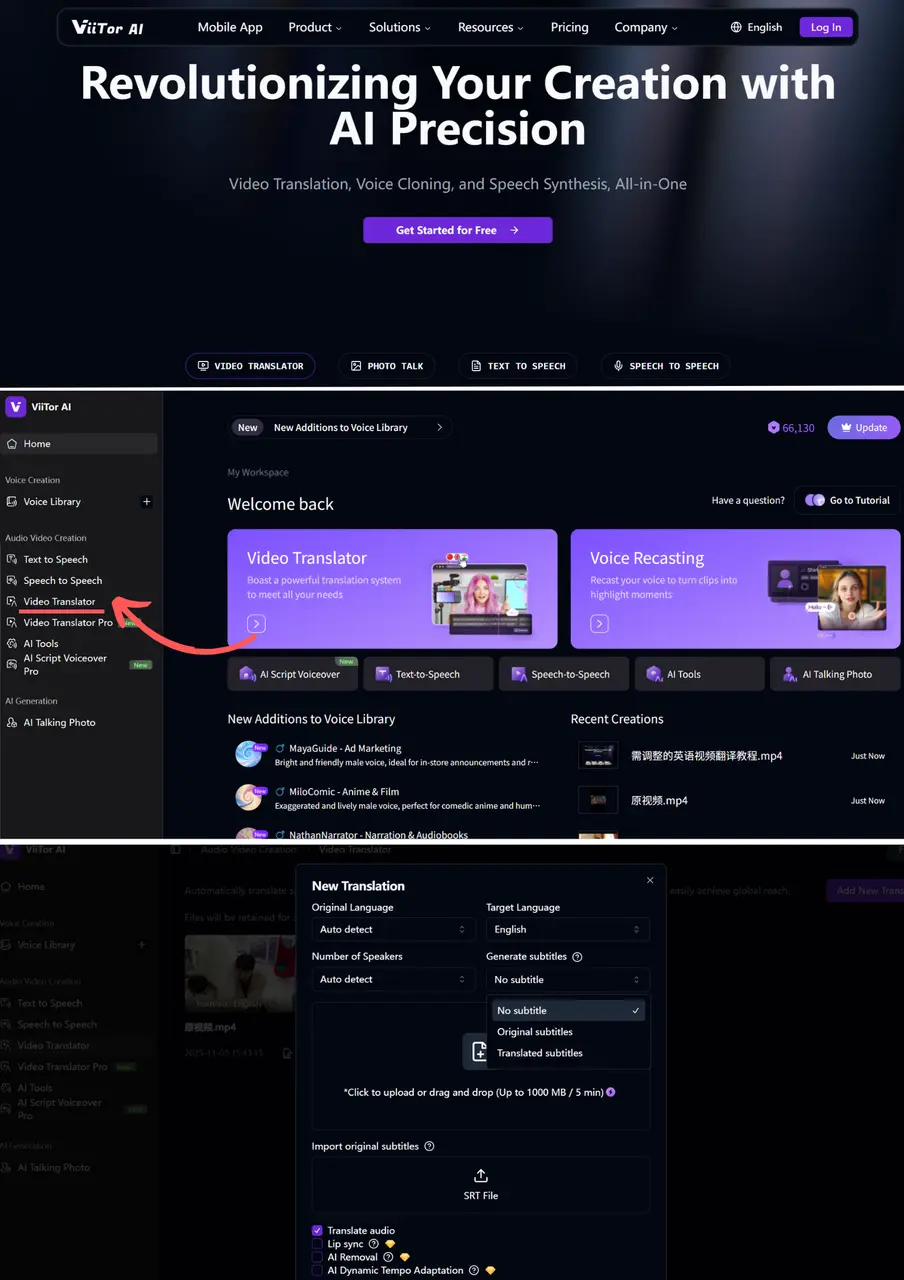
2. Set the translation language
Select the original language of the video from the "Source Language" drop-down menu.
Select the desired subtitle language from the "Target Language" drop-down menu.
Enable subtitle generation: Check the "Generate Subtitles" option.
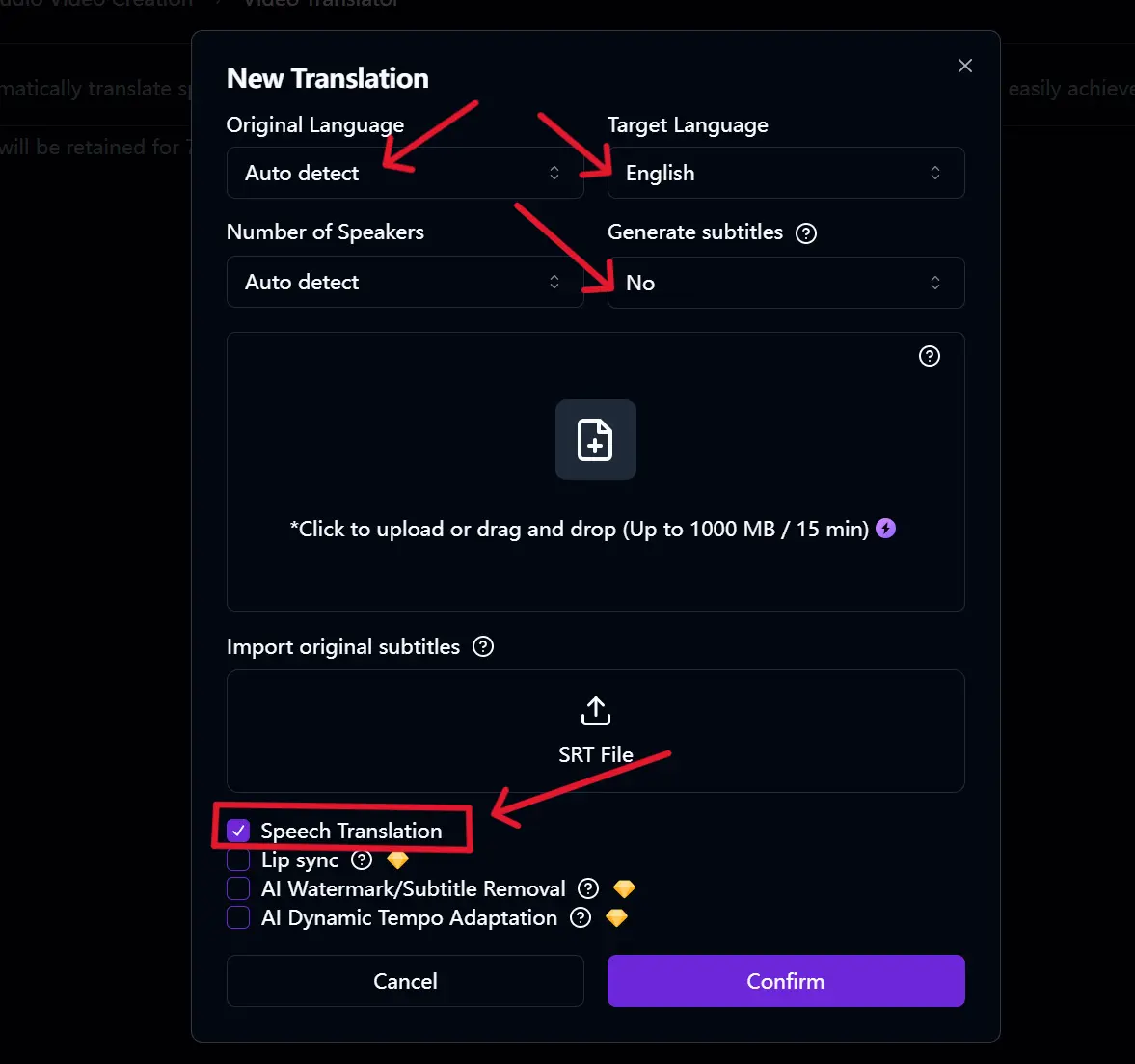
3. AI Automatic Generation & Proofreading & Export
Click "Start Translation" → Wait for AI to automatically transcribe, translate, and timeline the subtitles.
After confirming that everything is correct → Click "Export" → Download the SRT subtitle file.
Note: Open captions are good for viewers in noisy places or anyone unable to turn on sound. They’re handy for short, shareable promos.
How to Add Closed Captions to YouTube Videos
If you want to know how to add closed captioning to a YouTube video or how to create subtitles on YouTube, this is the most common way.
Step 1. Go to YouTube Studio
Open YouTube Studio and go to “Content.” Select the video you wish to add subtitles to.
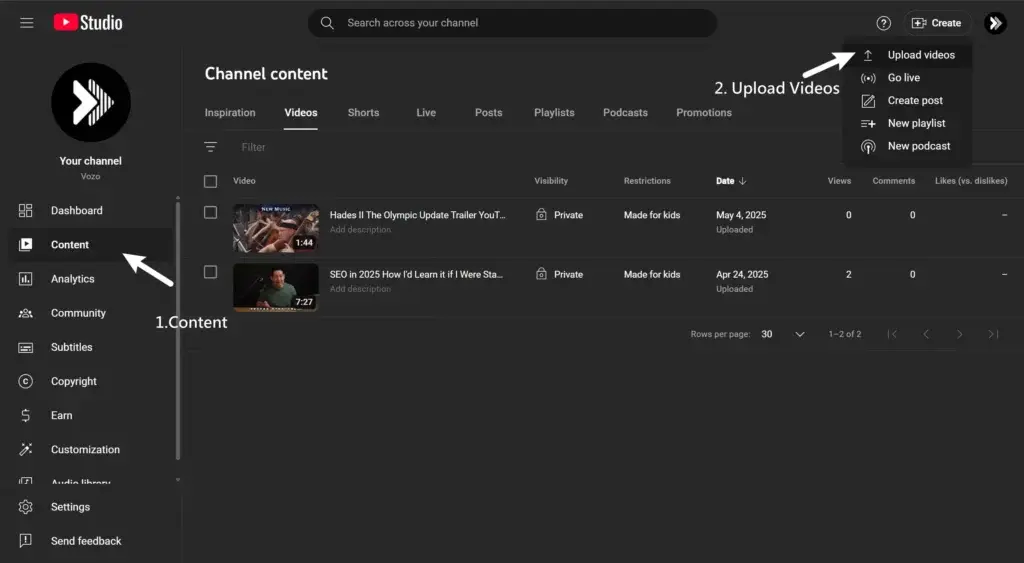
Step 2. Add Subtitles Panel
Click “Subtitles” in the left menu. Choose your video’s language and then click “Add” or “Edit.”
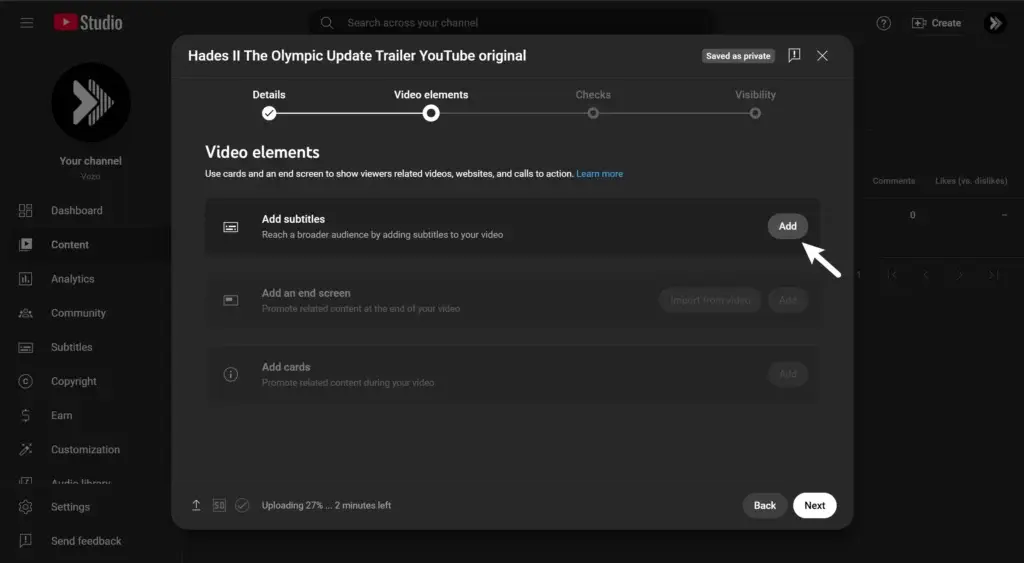
Step 3. Add .SRT File
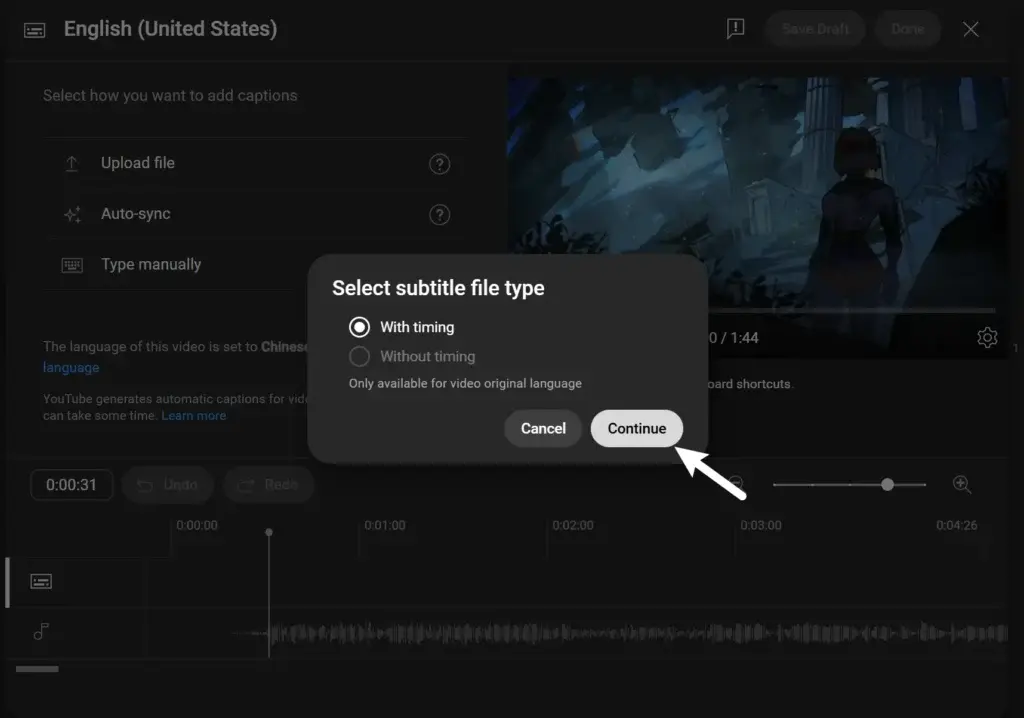
If you’ve used an AI subtitle generator (like ViiTor AI), export your SRT (subtitle) file. Click the options in YouTube (“Upload File”), select “With timing,” and upload your SRT file.
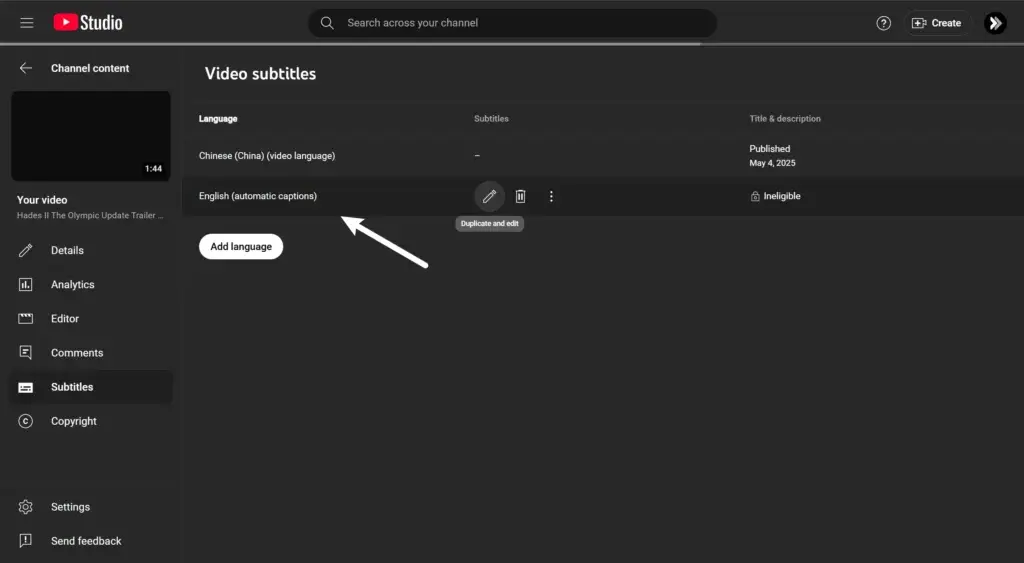
Pro Tip: If you don’t have a subtitle file, YouTube can automatically create closed captions. Click “Subtitles,” then “Duplicate and edit” next to “Automatic.” Edit for accuracy. Automatic captions are not always reliable with accents, names or noisy recordings.
Step 4. Save and Publish
Check subtitles for errors and then click “Publish.” Now viewers can turn captions on or off as they want.
FAQs for Adding Captions & Subtitles to YouTube Videos
Why are captions so important for YouTube videos today?
Captions can help your videos reach people with hearing loss, viewers who watch on mute and those in noisy places or who speak other languages. They can also help you with SEO and make your videos easier to find.
What’s the main difference between open captions and closed captions on YouTube?
Closed captions are text that you can turn on or off and also help you improve your search ranking. Open captions are part of the video and always stay on and you can’t remove them and search engines can’t read them.
Which type of caption is best for SEO?
Closed captions and translated subtitles both can help you improve your SEO. Search engines read and index the text from these files. Open captions don’t help with search because they are part of the video image.
Should I use open captions, closed captions or translated subtitles?
- Use closed captions in most YouTube videos so viewers can control them and help your video get found.
- Use translated subtitles to reach new audiences in other languages.
- Use open captions if you want captions always on or need custom fonts without viewer control.
YouTube的自动字幕功能准确度如何?
YouTube 的自动字幕功能速度很快,但对于人名、专业术语、特殊发音或背景噪音来说并不完美。您应该始终在发布前检查并编辑字幕。